 Kerim Koç

Contents
Setting Up Everything on a Single Server
A single-server setup is when the entire environment lives on one server. For a typical web application, this includes the web server, application server and database server. A common variation of this setup is the LAMP stack, which stands for L inux, A pache, M ySQL and P HP on a single server. An example use case is when you want to get an application up and running quickly. A basic setup like this can be used to test an idea or to get a simple web page up and running.
Unfortunately, this offers very little in terms of scalability and component isolation. In addition, the application and the database use the same server resources, such as CPU, memory, I/O and more. As a result, this can lead to poor performance and make it difficult to determine the root cause. Below is a visual representation of using a single server:

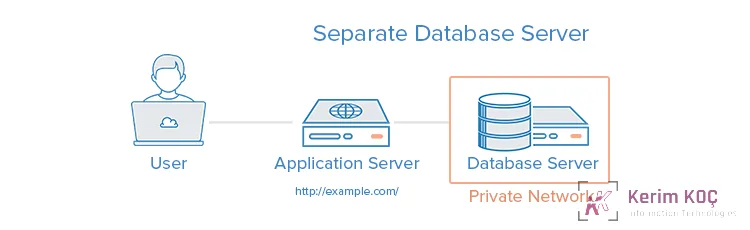
Setting Up a Separate Database Server
The database management system (DBMS) can be separated from the rest of the environment to eliminate resource contention between the application and the database, and to improve security by removing the database from the DMZ or the public internet .
An example use case is that this can get your application up and running quickly and prevent the application and the database from fighting for the same system resources. You can also scale the application and database tiers vertically, each on its own. This is possible by adding more resources to whichever server needs more capacity. Depending on your setup, this can also improve security by removing your database from the DMZ.
This setup is slightly more complex than a single server. If the network connection between the two servers is geographically distant, performance problems such as high latency can arise. There can also be performance problems if the bandwidth is too low for the amount of data being transferred. You can learn more about How To Set Up a Remote Database to Optimize Site Performance with MySQL . Below is a visual representation of using a separate database server:
Setting Up a Load Balancer (Reverse Proxy)
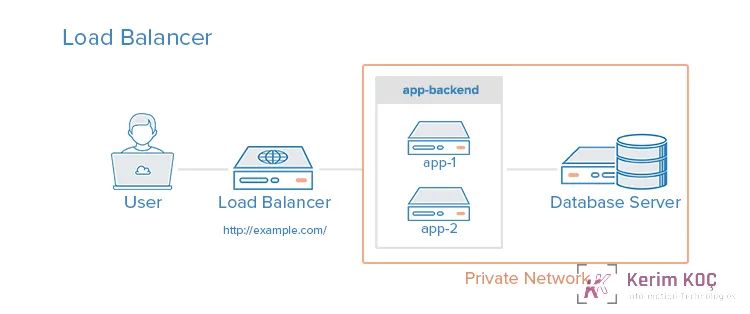
Load balancers can be added to a server environment to improve performance and reliability by distributing the workload across multiple servers. If one of the load-balanced servers fails, the other servers handle the incoming traffic until the failed server becomes healthy again. A layer 7 application-layer reverse proxy can also be used to serve multiple applications over the same domain and port. A few types of software that can do reverse proxy load balancing are HAProxy, Nginx and Varnish.
An example use case is an environment that requires scaling by adding more servers, also known as horizontal scaling. When you set up a load balancer, it provides an environment capacity that can be scaled by adding more servers. It can also protect against DDOS attacks by limiting client connections to a reasonable amount and frequency.
Setting up a load balancer can cause a performance bottleneck if the load balancer does not have enough resources or is poorly configured. It can also introduce complexities that require additional consideration, such as where to perform SSL termination and how to handle applications that require sticky sessions. In addition, the load balancer is a single point of failure, which means your entire service could go down if it crashes. A high availability (HA) setup is an infrastructure without a single point of failure. Below is a visual representation of setting up a load balancer:
Setting Up an HTTP Accelerator (Caching Reverse Proxy)
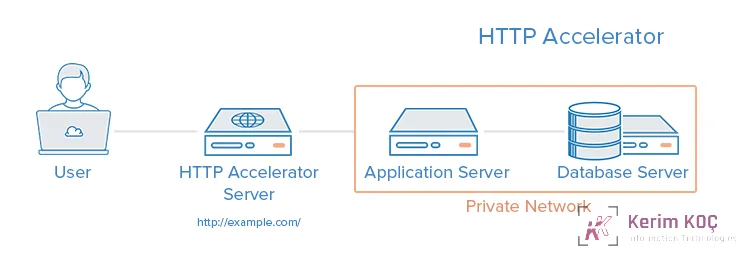
An HTTP accelerator, or caching HTTP reverse proxy, can be used to reduce the time it takes to serve content to a user through a variety of techniques. The main technique used with an HTTP accelerator is caching responses from a web or application server in memory, so that future requests for the same content can be served quickly with less unnecessary interaction with the web or application servers. A few examples of software capable of HTTP acceleration are Varnish, Squid and Nginx. An example use case is an environment with content-heavy dynamic web applications or many commonly accessed files.
HTTP acceleration can improve site performance by reducing the CPU load on a web server through caching and compression, thereby increasing user capacity. A reverse proxy can also be used as a load balancer, and some caching software can even protect against DDOS attacks. Unfortunately, it can reduce performance if the cache hit rate is low, and it needs tuning to get the best performance out of it. Below is a visual representation of setting up an HTTP Accelerator:
Setting Up Primary-Replica Database Replication
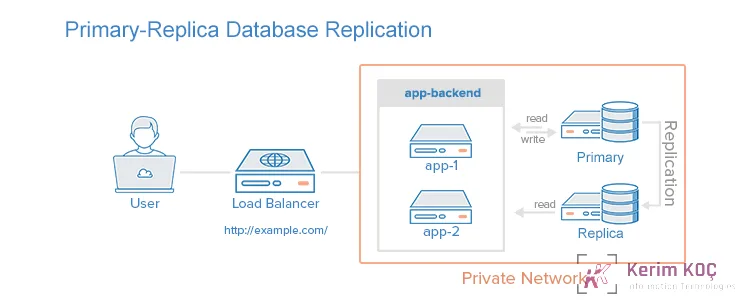
One way to improve the performance of a database system that performs many reads compared to writes, such as a CMS, is to use primary-replica database replication. Replication requires one primary node and one or more replica nodes. In this setup, all updates are sent to the primary node, and reads can be distributed across all nodes. An example use case is improving the read performance of an application's database tier. Setting up primary-replica database replication improves database read performance by spreading reads across the replicas, and improves write performance by using the primary only for updates, without spending time serving read requests.
Some of the downsides of primary-replica database replication are that the application accessing the database must have a mechanism to determine which database nodes it should send update and read requests to. Also, if the primary fails, no updates can be performed on the database until the issue is fixed. There is also no built-in failover in case the primary node fails. Below is a visual representation of a primary-replica replication setup with a single replica node:
Combining the Concepts
It is possible to load balance cache servers in addition to application servers and to use database replication in a single environment. The goal of combining these techniques is to benefit from each without introducing too many problems or too much complexity. Here is an example diagram of such a server environment setup:
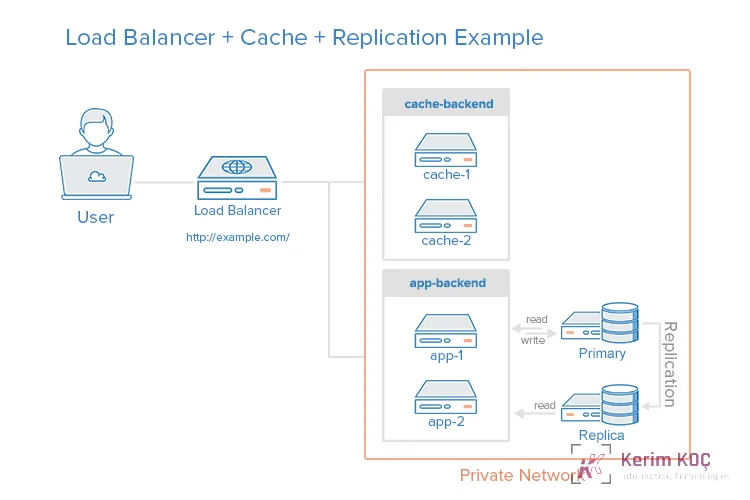
For example, imagine a scenario where the load balancer is configured to recognize static requests (images, CSS, JavaScript, etc.) and send them directly to the caching servers, and to send other requests to the application servers.
Here is the breakdown of the process when a user sends a request for dynamic content:
- The user requests dynamic content from http:// example.com/ (load balancer)
- The load balancer sends the request to the application backend
- The application backend reads from the database and returns the requested content to the load balancer
- The load balancer returns the requested data to the user
When a user requests static content, the following process applies:
- The load balancer checks the cache backend to verify whether the requested content is cached (cache-hit) or not (cache-miss).
- If the content is cached, the cache backend returns the requested content to the load balancer, skipping to the last step of the process and returning the data to the user. If the content is a cache miss, the cache server forwards the request through the load balancer to the application backend
- The load balancer forwards the request to the application backend
- The application backend reads from the database and returns the requested content to the load balancer
- The load balancer forwards the response to the cache backend
- The cache backend caches the content and returns it to the load balancer
- The load balancer returns the requested data to the user
This environment still has two single points of failure, the load balancer and the primary database server, but it provides all the other reliability and performance benefits described in the previous sections.


