 Kerim Koç
Contents
- 1. MySQL InnoDB Cluster
- Overview
- Components
- Operating Modes
- Minimum Requirements
- Basic Setup Steps
- Advantages and Disadvantages
- When Should You Choose It?
- 2. MySQL NDB Cluster
- Overview
- Architecture and Node Types
- Data Distribution Model
- Basic Configuration
- Advantages and Disadvantages
- When Should You Choose It?
- 3. Galera Cluster (Percona XtraDB / MariaDB Galera)
- Overview
- How It Works
- Key Features
- Setup Example (Percona XtraDB Cluster)
- Galera-Specific Restrictions
- Advantages and Disadvantages
- When Should You Choose It?
- 4. MySQL Replication (Master-Slave / Source-Replica)
- Overview
- Replication Types
- Basic Setup
- Common Topologies
- Failover Management
- Advantages and Disadvantages
- When Should You Choose It?
- Comparison Table
- Conclusion: Choosing the Right Solution
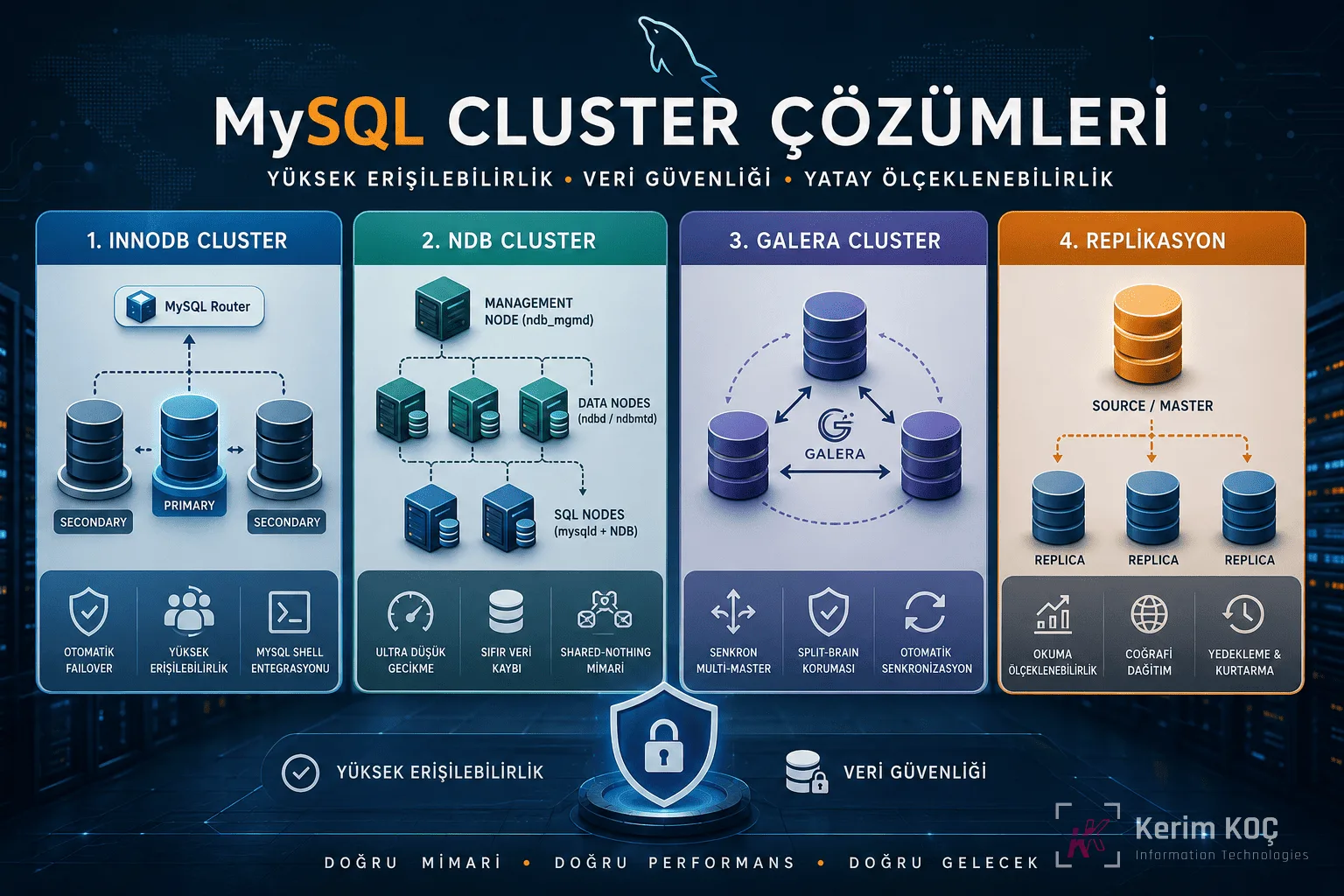
High availability, data security and horizontal scalability have become indispensable requirements of today's database infrastructures. While a single MySQL server is sufficient for small and medium-sized projects, growing traffic, the expectation of uninterrupted service and the risk of data loss make the move to distributed architectures necessary. This article examines the four core clustering approaches in the MySQL ecosystem in detail.
1. MySQL InnoDB Cluster
Overview
InnoDB Cluster is Oracle's official high availability solution for MySQL. By combining three core components, it offers an "out-of-the-box" cluster experience.
Components
MySQL Group Replication: This is the heart of the cluster. Using a Paxos-based consensus protocol, it guarantees that all nodes in the group share the same data state. A transaction is committed only when it is confirmed by the majority, which ensures data consistency.
MySQL Shell: This is the advanced management tool used to create, configure and monitor the cluster. It works in Python and JavaScript modes. With high-level API functions such as dba.createCluster(), it reduces complex replication setups to a few commands.
MySQL Router: This is a lightweight proxy layer that sits between the application servers and the cluster nodes. It automatically routes incoming connections to the active primary node. If the primary crashes, it provides a seamless switch to the newly elected primary. For read-heavy workloads, it can perform round-robin balancing.
Operating Modes
Single-Primary Mode: This is the default and recommended mode. Only one node accepts write operations, while the other nodes are read-only. If the primary node crashes, the group automatically elects a new primary. The risk of write conflicts is zero.
Multi-Primary Mode: All nodes can write simultaneously. It offers higher write throughput, but a conflict detection mechanism (certification-based conflict detection) comes into play. If a concurrent write to the same row occurs, one of the transactions is rolled back. It requires careful design at the application layer.
Minimum Requirements
At least 3 nodes are required for the cluster to work properly. Paxos consensus is based on the majority principle (quorum); even if one of the 3 nodes crashes, the remaining 2 nodes form a majority and the service continues. 3 or 5 nodes are common for production environments. An even number is not recommended because the risk of losing quorum increases in split-brain scenarios.
Basic Setup Steps
bash
# 1. Her node'da MySQL 8.0+ kurulumu
sudo apt install mysql-server

# 2. my.cnf settings of each node
# server-id must be unique
server-id=1
gtid_mode=ON
enforce_gtid_consistency=ON
binlog_checksum=NONE
log_bin=mysql-bin
log_slave_updates=ON
binlog_format=ROW
master_info_repository=TABLE
relay_log_info_repository=TABLE
plugin_load_add='group_replication.so'
javascript
// 3. Create the cluster with MySQL Shell
shell.connect('root@node1:3306')
var cluster = dba.createCluster('myCluster')

// 4. Add the other nodes
cluster.addInstance('root@node2:3306')
cluster.addInstance('root@node3:3306')

// 5. Status check
cluster.status()
Advantages and Disadvantages
InnoDB Cluster is relatively easy to set up thanks to Oracle's official support and integrated tools. Automatic failover, metadata-based routing and the strong consistency guarantees provided by Group Replication are its prominent advantages. On the other hand, write performance depends on a single node (in single-primary mode), performance drops in WAN environments with high latency, and the limitations of Group Replication (large transactions, foreign key constraints) may be reflected in the application.
When Should You Choose It?
InnoDB Cluster is ideal for medium to large projects that want to stay within the MySQL ecosystem, need automatic failover and have read-heavy workloads. If official support and a toolchain are your priority, it is the strongest candidate.
2. MySQL NDB Cluster
Overview
NDB (Network DataBase) Cluster is a special MySQL solution based on a shared-nothing architecture, designed for sectors that require ultra-low latency and "five-nines" (99.999%) availability, such as telecom and finance. All or most of the data is kept in memory (in-memory).
Architecture and Node Types
Management Node (ndb_mgmd): Holds the cluster's configuration, coordinates the connection of nodes to each other and monitors the health of the cluster. It is recommended to run it redundantly in production.
Data Node (ndbd / ndbmtd): These are the nodes where the data is actually stored and replicated. Data is divided into node groups, and each partition is copied synchronously between at least two data nodes. ndbmtd is the multi-threaded version and is preferred on modern hardware.
SQL Node (mysqld + NDB engine): These are the interface nodes that applications connect to and that speak the standard MySQL protocol. The NDB storage engine runs actively. Multiple SQL nodes can read and write in parallel.
Data Distribution Model
NDB distributes data to the data nodes using hash-based partitioning. Each row is assigned to a partition based on its primary key. Each partition has at least one replica; if a data node crashes, the node holding the replica continues to serve. When the node comes back, automatic synchronization begins.
Basic Configuration
ini
# config.ini - Management Node configuration
[ndbd default]
NoOfReplicas=2
DataMemory=4G
IndexMemory=512M

[ndb_mgmd]
hostname=mgm1.example.com
datadir=/var/lib/mysql-cluster

[ndbd]
hostname=data1.example.com
datadir=/var/lib/mysql-cluster

[ndbd]
hostname=data2.example.com
datadir=/var/lib/mysql-cluster

[mysqld]
hostname=sql1.example.com

[mysqld]
hostname=sql2.example.com
bash
# Start the management node
ndb_mgmd -f /var/lib/mysql-cluster/config.ini

# Start the data node
ndbd --connect-string="mgm1.example.com:1186"

# Start the SQL node
mysqld --ndbcluster --ndb-connectstring="mgm1.example.com:1186"
Advantages and Disadvantages
NDB Cluster offers microsecond-level read latencies, true multi-master writes, automatic sharding and 99.999% availability. The zero data loss guarantee (synchronous replication) is one of its strongest points. However, its architectural complexity is high; it requires at least 4 machines (1 management, 2 data, 1 SQL). Because data is kept in memory, RAM cost is an important factor. In addition, JOIN performance is not as good as InnoDB, and some SQL features (for example, certain data types and foreign key limitations) are not supported.
When Should You Choose It?
NDB Cluster is the most suitable option for real-time systems (payment infrastructures, telecommunications HLR/HSS), ultra-low latency requirements, intensive key-value access patterns and environments with zero downtime tolerance. It is generally overly complex for traditional web applications.
3. Galera Cluster (Percona XtraDB / MariaDB Galera)
Overview
Galera Cluster is a synchronous multi-master replication solution built on the wsrep (Write Set Replication) API developed by Codership. It has two main distributions, Percona XtraDB Cluster and MariaDB Galera Cluster; both use the same Galera library.
How It Works
In Galera, every node is a full copy of MySQL/MariaDB, and every node can be written to. When a transaction is committed, a change package called a "write set" is sent to all nodes. Each node runs this write set through a certification process: if there is no conflict it is applied, and if there is one it is rolled back. This process is called "virtually synchronous replication"; it is not fully synchronous, but it offers much stronger consistency than asynchronous replication.
Key Features
Synchronous Multi-Master: Every node can be read from and written to. There is no need to route writes at the application layer (although it is recommended as a best practice).
Automatic Node Provisioning: When a new node joins the cluster, it synchronizes automatically via SST (State Snapshot Transfer) or IST (Incremental State Transfer).
Quorum and Split-Brain Protection: In the event of a network partition, the nodes on the majority side of the cluster continue to operate, while the minority side puts itself into read-only mode.
Setup Example (Percona XtraDB Cluster)
bash
# Her node'da Percona XtraDB Cluster kurulumu
sudo apt install percona-xtradb-cluster-80
ini
# Node 1 - my.cnf
[mysqld]
server-id=1
wsrep_provider=/usr/lib/galera4/libgalera_smm.so
wsrep_cluster_name="my_galera_cluster"
wsrep_cluster_address="gcomm://node1,node2,node3"
wsrep_node_name=node1
wsrep_node_address=192.168.1.101
wsrep_sst_method=xtrabackup-v2

pxc_strict_mode=ENFORCING
binlog_format=ROW
innodb_autoinc_lock_mode=2
bash
# Start the first node as bootstrap
sudo systemctl start mysql@bootstrap

# Start the other nodes normally
sudo systemctl start mysql  # node2 ve node3'te
sql
-- Cluster durumunu kontrol etme
SHOW STATUS LIKE 'wsrep_cluster_size';
-- Result: 3 (all nodes connected)

SHOW STATUS LIKE 'wsrep_cluster_status';
-- Result: Primary (quorum established)

SHOW STATUS LIKE 'wsrep_local_state_comment';
-- Result: Synced (node synchronized)
Galera-Specific Restrictions
Some rules apply for Galera to work efficiently. All tables must have a primary key. Only the InnoDB/XtraDB engines are supported; MyISAM is not replicated. Large transactions (updating hundreds of thousands of rows) seriously affect performance because the write set size grows. In addition, table-locking statements such as LOCK TABLES and GET_LOCK() are not supported cluster-wide.
Advantages and Disadvantages
Galera's strongest point is its ease of use. Compared with InnoDB Cluster, it requires fewer components (no separate Router/Shell), setup is relatively simple, and it has been proven in production environments for years. Having every node active optimizes resource usage. On the downside, certification latency over a WAN reduces write speed, the deadlock rate increases in case of conflicts, and the engine/DDL restrictions mentioned above apply.
When Should You Choose It?
Galera is an excellent choice for teams that want high availability for web applications, want to distribute reads and writes across all nodes, are looking for simple setup and management, and use the MariaDB or Percona ecosystem.
4. MySQL Replication (Master-Slave / Source-Replica)
Overview
MySQL Replication is the oldest and most widely used distributed architecture. Although it is technically not a cluster solution, in practice it is used by many teams for high availability and read scaling. A source (source/master) server receives write operations and forwards the changes through the binary log to one or more copies (replica/slave).
Replication Types
Asynchronous Replication: This is the default mode. After committing a transaction, the source does not wait for confirmation from the replica. It provides low latency, but if the source crashes, transactions that have not yet been replicated may be lost.
Semi-Synchronous Replication: Before committing, the source waits for at least one replica to confirm that it has received the transaction (written it to its relay log). It greatly reduces the risk of data loss but slightly increases write latency.
GTID-Based Replication: Using a Global Transaction Identifier, it assigns a universally unique ID to every transaction. It makes it easier to align replicas with the source during failover and simplifies management.
Basic Setup
ini
# Source (Master) - my.cnf
[mysqld]
server-id=1
log_bin=mysql-bin
binlog_format=ROW
gtid_mode=ON
enforce_gtid_consistency=ON
ini
# Replica (Slave) - my.cnf
[mysqld]
server-id=2
relay_log=relay-bin
read_only=ON
gtid_mode=ON
enforce_gtid_consistency=ON
sql
-- Create the replication user on the Source
CREATE USER 'repl_user'@'%' IDENTIFIED BY 'strong_password';
GRANT REPLICATION SLAVE ON *.* TO 'repl_user'@'%';

-- Start replication on the Replica (GTID-based)
CHANGE REPLICATION SOURCE TO
    SOURCE_HOST='source.example.com',
    SOURCE_USER='repl_user',
    SOURCE_PASSWORD='strong_password',
    SOURCE_AUTO_POSITION=1;

START REPLICA;
SHOW REPLICA STATUS\G
Common Topologies
Single Source, Multiple Replicas: This is the simplest structure. The read workload is distributed to the replicas; the source handles only writes. It is sufficient for most web applications.
Chain Replication: Sequential replication in the form Source → Replica A → Replica B. It reduces the replication load on the source but increases lag.
Bidirectional (Circular) Replication: Two or more nodes replicate to each other. Although it looks like multi-master, it has no conflict management; therefore it is generally not recommended.
Failover Management
Asynchronous replication does not provide automatic failover. Additional tools are used for failover. Tools such as MHA (Master High Availability) Manager, Orchestrator and ProxySQL can automatically promote one of the replicas to be the new source when the source crashes.
Advantages and Disadvantages
The biggest advantage of replication is its simplicity. It requires no additional software and is a native feature of MySQL. It is very effective for read scaling; geographically distributed replicas work well over a WAN. On the downside, there is no automatic failover (an external tool is required), there is a risk of data loss in asynchronous mode, and write scaling is not possible (a single source can become a bottleneck).
When Should You Choose It?
Replication is the most suitable solution for read-heavy workloads, reporting/analytics replicas, geographic distribution requirements, secondary copies for backup purposes and simple high availability needs. It is also a natural starting point for low-budget projects.
Comparison Table
| Feature | InnoDB Cluster | NDB Cluster | Galera Cluster | Replication |
|---|---|---|---|---|
| Architecture | Single/Multi-Primary | Shared-Nothing | Multi-Master | Source-Replica |
| Replication Type | Synchronous (Paxos) | Synchronous | Virtually Synchronous | Asynchronous / Semi-Synchronous |
| Minimum Nodes | 3 | 4 | 3 | 2 |
| Automatic Failover | Yes | Yes | Yes | No (external tool) |
| Write Scaling | Limited | Yes | Limited | No |
| Read Scaling | Yes | Yes | Yes | Yes |
| Latency | Low | Very Low | Low-Medium | Variable |
| Setup Complexity | Medium | High | Low-Medium | Low |
| WAN Suitability | Limited | Limited | Limited | Good |
| Data Loss Risk | Very Low | None | Very Low | Present (asynchronous) |
Conclusion: Choosing the Right Solution
Choosing the right cluster architecture depends on the requirements of the project. If you want official support and an integrated toolchain, choose InnoDB Cluster; for critical systems that require microsecond latency and zero downtime, NDB Cluster; if you want multi-master writes with simple setup, Galera Cluster; and if read scaling or a backup replica is all you need, classic replication is the most sensible starting point.
Every architecture has its strengths and weaknesses. Starting small and moving to more complex architectures as your needs grow is generally the healthiest approach. Starting with replication and later promoting to InnoDB Cluster or Galera is a common and successful strategy.