 Kerim Koç
Contents
A proxy , also called a proxy server, is server software that acts as an intermediary between a client and a server on the internet. Without a proxy, a client sends a request for a resource directly to a server, and the server then sends the resource directly back to the client. Although this approach is simple to understand and implement, adding a proxy provides benefits in the form of increased performance, privacy, security and more. As an additional pass-through layer, a proxy acts as the internet's gateway between clients and servers.
Generally speaking, a package of server hardware combined with installed proxy software is also often called a proxy server. However, this article will focus on proxies as traditionally defined as software, and in the context of web servers. You will break down the two main types, a forward proxy and a reverse proxy . Each type has a different use case, and they are often confused because of their similar naming conventions.
This article will give you an understanding of what proxies and their subtypes are and how they are useful in general setups. By reading this article, you will be able to identify situations where a proxy is useful and choose the right solution between a forward proxy and a reverse proxy in any situation.
Understanding Forward Proxies
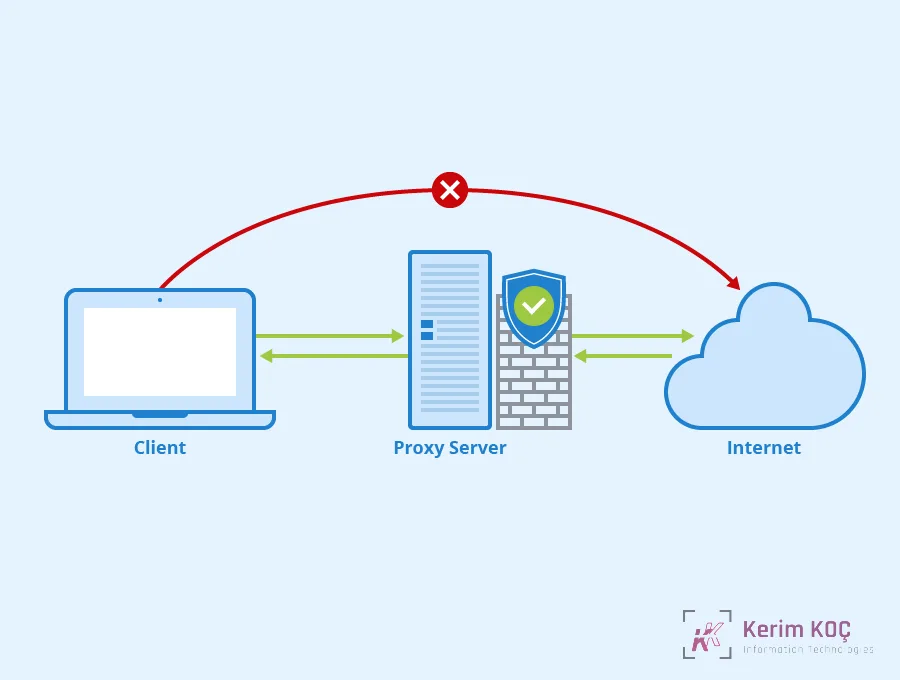
A forward proxy, also called an open proxy , acts as a representative of a client that is trying to send a request to an origin server over the internet. In this scenario, all attempts by the client to send requests will be sent to the forward proxy instead. The forward proxy examines the request on behalf of the client. First, it will determine whether this client is authorized to send requests through this particular forward proxy. It will then either deny the request or forward it to the origin server. The client has no direct access to the internet; it can only reach what the forward proxy allows it to access.
A common use case for forward proxies is achieving greater privacy or anonymity on the internet. A forward proxy accesses the internet in place of a client, and in the process may use an IP address different from the client's original IP address.
Depending on how it is configured, a forward proxy can provide a set of features that allow you to:
- Avoid ad tracking.
- Bypass surveillance.
- Get around restrictions based on your geographic location.
Forward proxies are also used in systems for centralized security and permission-based access, such as in a workplace. When all internet traffic passes through a common forward proxy layer, an administrator can allow only certain clients to access the internet, filtered through a common firewall. Instead of maintaining firewalls for the client layer, which may include many machines with different environments and users, a firewall can be placed at the forward proxy layer.
Note that forward proxies must be set up manually in order to be used, whereas reverse proxies may go unnoticed by the client. Depending on whether the client's IP address is passed on to the origin server by the forward proxy, privacy and anonymity can be granted or left transparent.
There are a few options to consider for forward proxies:
- Apache : A popular open-source web server that offers forward proxy functionality.
- Nginx : Another popular open-source web server with forward proxy functionality.
- Squid : An open-source forward proxy that uses the HTTP protocol. This option does not include a full web server solution.
- Dante : A forward proxy that uses the SOCKS protocol instead of HTTP, making it better suited for use cases such as peer-to-peer traffic.
Understanding Reverse Proxies
A reverse proxy acts as a representative of a web server and handles requests from clients on its behalf. This web server can be a single server or multiple servers. It can also be an application server such as Gunicorn . In both scenarios, a request comes in from a client over the internet. Normally, this request would go directly to the web server that holds the resources the client is requesting. Instead, a reverse proxy acts as an intermediary, isolating the web server from direct interaction with the open internet.
From the client's point of view, interacting with a reverse proxy is no different from interacting directly with the web server. It is functionally the same, and the client cannot tell the difference. The client requests a resource without any additional configuration and then receives it.
Reverse proxies provide features such as the following:
- Centralized security for the web server layer.
- Routing incoming traffic according to rules that you can configure.
- Added caching functionality.
While centralized security is an advantage of both forward and reverse proxies, reverse proxies provide it for the web server layer rather than the client layer. Instead of focusing on maintaining firewalls at the web server layer, which may include multiple servers with different configurations, most of the firewall security can be concentrated at the reverse proxy layer. In addition, removing the responsibility of interfacing with a firewall and handling client requests from the web servers allows them to focus solely on serving resources.
When there are multiple servers behind a reverse proxy, the reverse proxy also manages routing which requests go to which server. Multiple web servers may be serving the same resources, each serving different types of resources, or a combination of the two. These servers can use the HTTP protocol as a traditional web server, but may also include application server protocols such as FastCGI. You can configure a reverse proxy to direct clients to specific servers depending on the requested resource, or to follow certain rules regarding traffic load.
Reverse proxies can also benefit from being placed in front of web servers by offering caching functionality. Large static assets can be configured with caching rules to avoid hitting the web servers on every request, and some solutions offer the option to serve static assets directly without touching the web server at all. A reverse proxy can also handle compression of these assets.
The popular Nginx web server is also a popular reverse proxy solution. While the Apache web server also has reverse proxy capability, it is an add-on feature for Apache, whereas Nginx was originally built for and focused on reverse proxy functionality.
Telling Forward Proxy and Reverse Proxy Use Cases Apart
The labels "forward" and "reverse" can be confusing, because they carry connotations of directionality and misleading comparisons with "incoming" and "outgoing" traffic, whereas both types of proxy handle requests and responses. Instead, a better way to distinguish forward and reverse proxies is to examine the needs of the application you are building.
A reverse proxy is useful when you are building a solution to serve web applications on the internet. They represent your web servers in any interaction with the internet.
A forward proxy is useful when it is placed in front of client traffic, either for your personal use or in a workplace environment. They represent your client traffic in any interaction with the internet.
Distinguishing by use case, rather than focusing on the similar naming conventions, will help you avoid confusion.


