Kerim Koç

Since this is essentially the same as the Zimbra LDAP preparation, we can repeat the same steps to keep this article from getting too long. I will write a summary here.
Preparation:
- Set the IP address to static and configure /etc/hosts.
- Set the hostname and the date and time.
- Disable the firewall.
- Install the NTP server. Disable all servers in /etc/ntp.conf and add
"server 192.168.100.100 iburst". - By default, Ubuntu 20/04 ships with
systemd-resolved. Edit/etc/systemd/resolved.confand configure it as follows.
[Resolve]
DNS=192.168.100.100
#FallbackDNS=
Domains=kerimkoc.com
After that, test lookups against the other server. They should be answered by the IP address in the DNS field. As we know, port 127.0.0.53 is the system resolver.
root@mbox1:~# nslookup ldap.kerimkoc.local
Server:         127.0.0.53
Address:        127.0.0.53#53

Non-authoritative answer:
Name:   ldap.kerimkoc.local
Address: 192.168.100.100

root@mbox1:~# nslookup mail.kerimkoc.com
Server:         127.0.0.53
Address:        127.0.0.53#53

Non-authoritative answer:
Name:   mail.kerimkoc.com
Address: 192.168.100.102
Next, test the NTP client to see whether it can query the NTP server 192.168.100.100. Use the command ntpq -c sysinfo. Look at the red-line flag sync_ntp. This flag indicates that it can query the ntp server 192.168.100.100 properly.
root@mbox1:~# ntpq -c sysinfo
associd=0 status=0615 leap_none, sync_ntp, 1 event, clock_sync,
system peer: ldap.kerimkoc.local:123
system peer mode: client
leap indicator: 00
stratum: 4
log2 precision: -25
root delay: 4.961
root dispersion: 235.535
reference ID: 192.168.100.100
reference time: e68cd30d.5979d076 Thu, Jul 28 2023 16:19:09.349
system jitter: 0.000000
clock jitter: 1.711
clock wander: 0.115
broadcast delay: -50.000
symm. auth. delay: 0.000
Install Zimbra Mailbox 1
Let's do it.
wget https://files.zimbra.com/downloads/8.8.15_GA/zcs-8.8.15_GA_4179.UBUNTU20_64.20211118033954.tgz
tar -zxvf zcs-8.8.15_GA_4179.UBUNTU20_64.20211118033954.tgz
cd zcs-8.8.15_GA_4179.UBUNTU20_64.20211118033954
./install.sh

Operations logged to /tmp/install.log.v39fi0HW
Checking for existing installation...
    zimbra-drive...NOT FOUND
    zimbra-imapd...NOT FOUND
    ...
---CUT---
    ...
----------------------------------------------------------------------
Do you agree with the terms of the software license agreement? [N] y
Use Zimbra's package repository [Y]

Warning: apt-key output should not be parsed (stdout is not a terminal)
Importing Zimbra GPG key
Configuring package repository
Checking for installable packages

Found zimbra-core (local)
Found zimbra-ldap (local)
Found zimbra-logger (local)
Found zimbra-mta (local)
Found zimbra-dnscache (local)
Found zimbra-snmp (local)
Found zimbra-store (local)
Found zimbra-apache (local)
Found zimbra-spell (local)
Found zimbra-memcached (repo)
Found zimbra-proxy (local)
Found zimbra-drive (repo)
Found zimbra-imapd (local)
Found zimbra-patch (repo)
Found zimbra-mta-patch (repo)
Found zimbra-proxy-patch (repo)

Select the packages to install

Install zimbra-ldap [Y] n
Install zimbra-logger [Y] Y
Install zimbra-mta [Y] n
Install zimbra-dnscache [N] n
Install zimbra-snmp [Y] n
Install zimbra-store [Y] Y
Install zimbra-apache [Y] Y
Install zimbra-spell [Y] Y
Install zimbra-memcached [Y] n
Install zimbra-proxy [Y] n
Install zimbra-drive [Y] n
Install zimbra-imapd (BETA - for evaluation only) [N] n

Install zimbra-chat [Y] n
Checking required space for zimbra-core
Checking space for zimbra-store
Checking required packages for zimbra-store
zimbra-store package check complete.

Installing:
    zimbra-core
    zimbra-logger
    zimbra-store
    zimbra-apache
    zimbra-spell
    zimbra-patch

The system will be modified.  Continue? [N] y
...CUT...
If a dialog like the one below is shown, press 1.
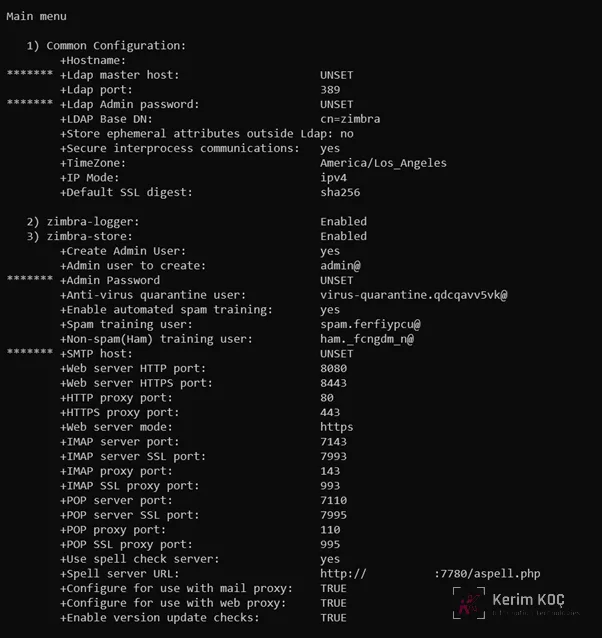
Next, note the line marked with an asterisk '******' that has the value "UNSET".
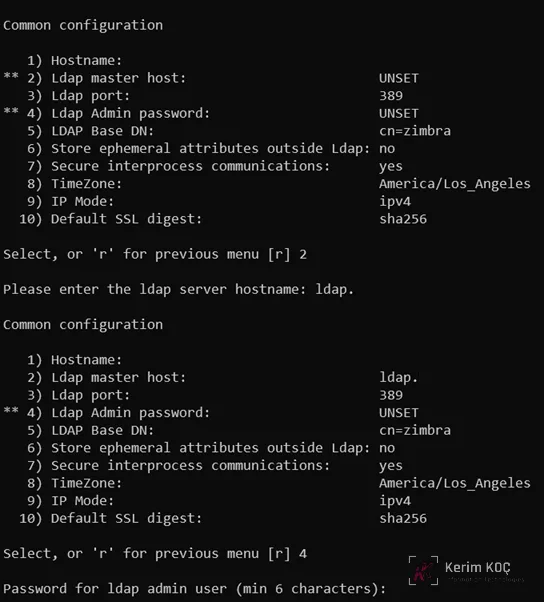
- Ldap Host : ldap.kerimkoc.local
- Ldap admin password: find the password on the zimbra ldap host.
The trick is to log in to the Zimbra LDAP server. Look at the red line below.
root@ldap:~# su - zimbra
zimbra@ldap:~$ zmlocalconfig -s zimbra_ldap_password ldap_master_url
zimbra_ldap_password = WtHcMRpTV
ldap_master_url = ldap://ldap.kerimkoc.local:389
Next, set the zimbra time zone. Type the number '8' and then press ENTER. Fill in the number '51'. This is Asia/Bangkok.
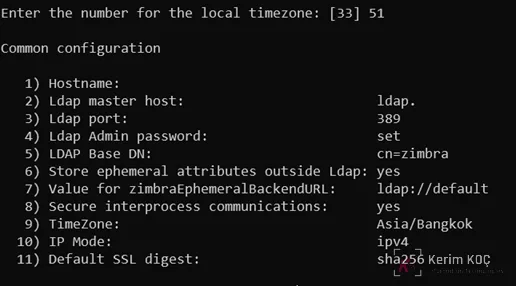
When you are done, type 'r'. And look at the asterisk at number '9'.
Fill in SMTP Server hostname: mta.kerimkoc.com_ We will configure this server later, after the installation is finished.
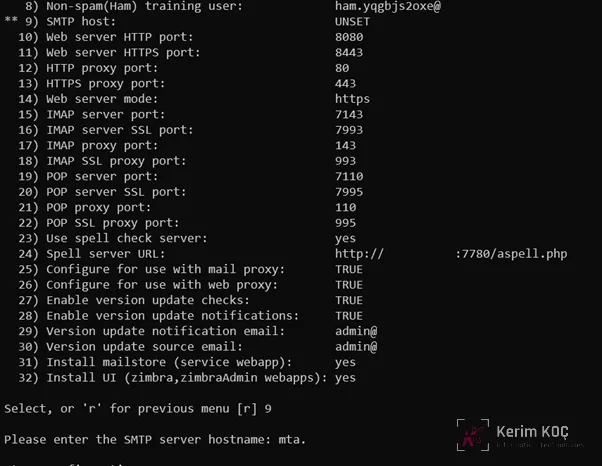
Press 'r' to go back. And follow the setup wizard until it finishes.
root@mbox1:~# su - zimbra
zimbra@mbox1:~$ zmcontrol status
Host mbox1.kerimkoc.com
        logger                  Running
        mailbox                 Running
        service webapp          Running
        snmp                    Running
        spell                   Running
        stats                   Running
        zimbra webapp           Running
        zimbraAdmin webapp      Running
        zimlet webapp           Running
        zmconfigd               Running